「私たち Smyths Toys は、顧客が求めるエクスペリエンスを、Google Cloud を利用して提供しています。すべてのワークロードにおいて、Google Cloud のユニークなインフラストラクチャとサービスを活用したいと考えています。無料の Google Cloud 移行ツールにより、私たちはほぼダウンタイムなしで、Windows サーバーを Google Cloud に簡単に移行できました。」— Smyths Toys の CTO、Rob Wilson 氏
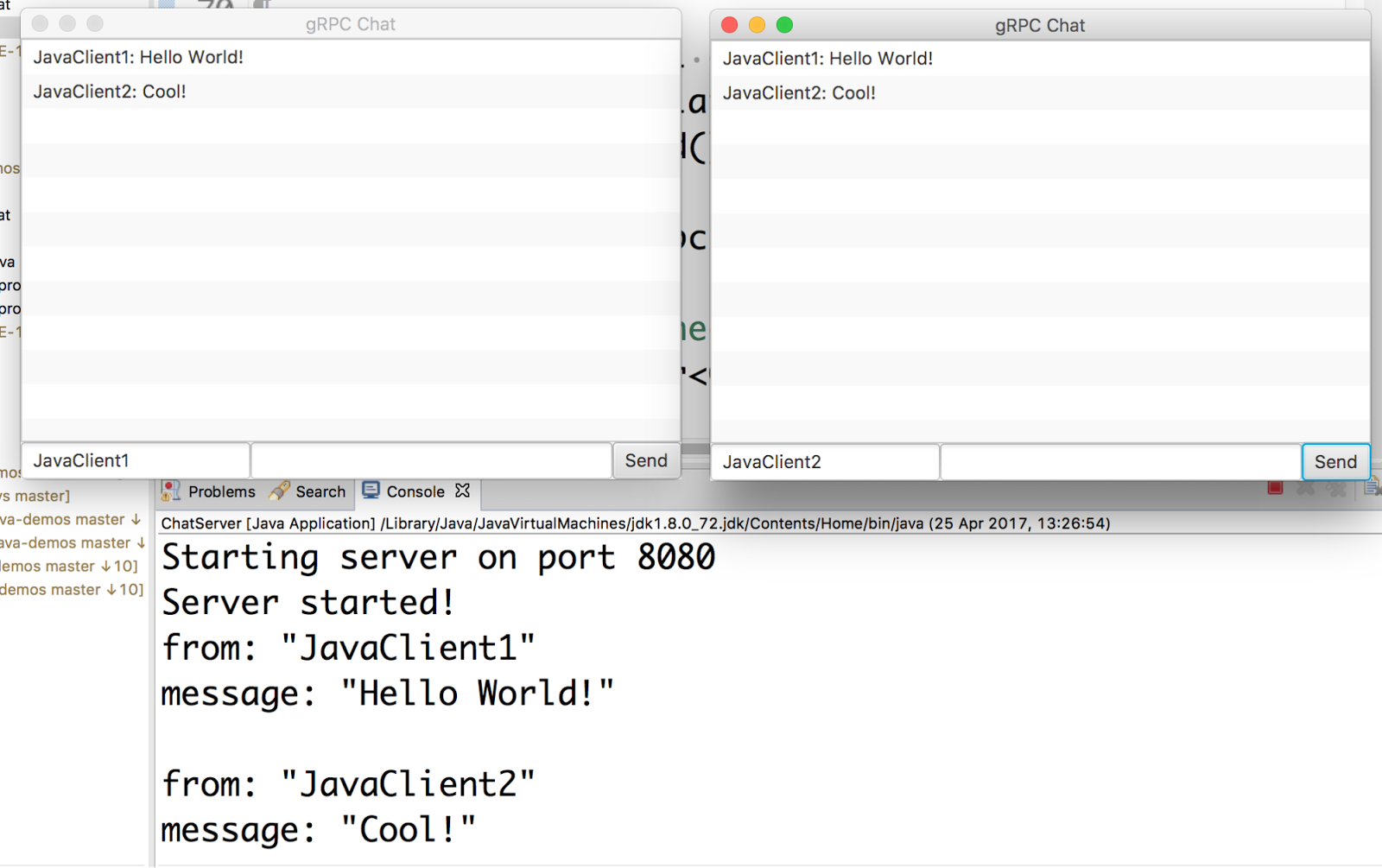
Starting server on port 8080
Server started!
Sending request
Received response: Hello there, Mete
ChatServerImpl.java
StreamObserver
ChatServerImpl.cs
npm install --save @google-cloud/storage
const Storage = require('@google-cloud/storage');

// Instantiates a client
const storage = Storage();

// References an existing bucket, e.g. “my-bucket”
const bucket = storage.bucket(bucketName);

// Upload a local file to the bucket, e.g. “./local/path/to/file.txt”
return bucket.upload(fileName)
 .then((results) => {
  const file = results[0];
  console.log(`File ${file.name} uploaded`);
});
<dependency>
    <groupid>com.google.cloud</groupid>
    <artifactid>google-cloud-datastore</artifactid>
    <version>1.0.0</version>
</dependency>
// Imports the Google Cloud Client Library
import com.google.cloud.datastore.Datastore;
import com.google.cloud.datastore.DatastoreOptions;
import com.google.cloud.datastore.Entity;
import com.google.cloud.datastore.Key;

public class QuickstartSample {
  public static void main(String... args) throws Exception {

  // Instantiates a client
  Datastore datastore = DatastoreOptions.getDefaultInstance().getService();

  // The kind for the new entity
  String kind = "Task";

  // The name/ID for the new entity
  String name = "sampletask1";

  // The Cloud Datastore key for the new entity
  Key taskKey = datastore.newKeyFactory().setKind(kind).newKey(name);

  // Prepares the new entity
  Entity task = Entity.newBuilder(taskKey)
  .set("description", "Buy milk")
  .build();

  // Saves the entity
  datastore.put(task);
  }
}
pip install --upgrade google-cloud-logging
import logging
import google.cloud.logging
client = google.cloud.logging.Client()
# Attaches a Google Stackdriver logging handler to the root logger
client.setup_logging(logging.INFO)
import logging
logging.error('This is an error')
FROM busybox

COPY ./lots-of-data /data

RUN rm -rf /data

CMD ["/bin/sh"]
FROM java:8

COPY . workdir/

WORKDIR workdir

RUN GRADLE_USER_HOME=cache ./gradlew buildDeb -x test

RUN dpkg -i ./gate-web/build/distributions/*.deb

CMD ["/opt/gate/bin/gate"]
FROM java:8

COPY . workdir/

WORKDIR workdir

RUN GRADLE_USER_HOME=cache ./gradlew buildDeb -x test && \
  dpkg -i ./gate-web/build/distributions/*.deb && \
  cd .. && \
  rm -rf workdir

CMD ["/opt/gate/bin/gate"]
steps:
- name: 'java:8'
  env: ['GRADLE_USER_HOME=cache']
  entrypoint: 'bash'
  args: ['-c', './gradlew gate-web:installDist -x test']
- name: 'gcr.io/cloud-builders/docker'
  args: ['build',
         '-t', 'gcr.io/$PROJECT_ID/$REPO_NAME:$COMMIT_SHA',
         '-t', 'gcr.io/$PROJECT_ID/$REPO_NAME:latest',
         '-f', 'Dockerfile.slim', '.']

images:
- 'gcr.io/$PROJECT_ID/$REPO_NAME:$COMMIT_SHA'
- 'gcr.io/$PROJECT_ID/$REPO_NAME:latest'
- name: 'java:8'
  env: ['GRADLE_USER_HOME=cache']
  entrypoint: 'bash'
  args: ['-c', './gradlew gate-web:installDist -x test']
- name: 'gcr.io/cloud-builders/docker'
  args: ['build',
         '-t', 'gcr.io/$PROJECT_ID/$REPO_NAME:$COMMIT_SHA',
         '-t', 'gcr.io/$PROJECT_ID/$REPO_NAME:latest',
         '-f', 'Dockerfile.slim', '.']
FROM openjdk:8u111-jre-alpine

COPY ./gate-web/build/install/gate /opt/gate

RUN apk --nocache add --update bash

CMD ["/opt/gate/bin/gate"]
images:
- 'gcr.io/$PROJECT_ID/$REPO_NAME:$COMMIT_SHA'
- 'gcr.io/$PROJECT_ID/$REPO_NAME:latest'